CONTINUING THE COMPASSPLATFORM STORY
You have seen the direction. Now see what opens first.
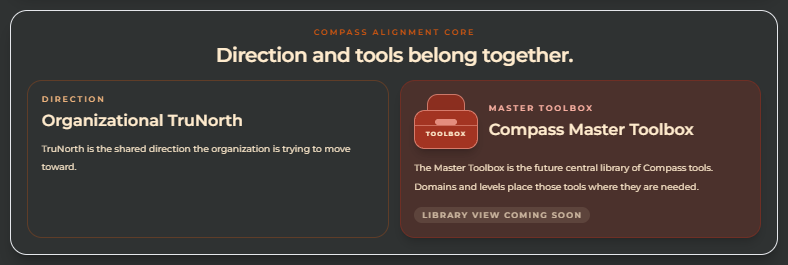
Organizational TruNorth is the shared direction shown as the sun. The Sunflower Domains are the major areas of work beginning to align around it.
Before you create your account, take a few minutes to preview the path, the first live tool, and what your team will receive.

Organizational TruNorth
The shared direction.

Sunflower Domains
The major areas of work beginning to turn toward one shared direction.
Before you create your account
What you will see first inside CompassPlatform.
You are not signing up for one tool. You are entering a guided platform that helps your organization see how programs, tools, systems, domains, learning, and decisions can begin working together.
WHAT YOU WILL SEE FIRST
01
See
See the work already happening.
CompassPlatform helps make programs, tools, decisions, and saved work easier to recognize as one system.
02
Organize
Place the work in a clearer structure.
You will see organization context, direction, Sunflower Domains, tools, reports, and learning begin to connect.
03
Begin
Start with one guided pathway.
Your first live pathway helps make work visible before you move deeper into the platform.
Preview the path
Before you start, see the path you are about to enter.
The previews below show what opens first, so you know where you are going before you start.
01 · CompassPlatform map
See the bigger system.
After signup, you enter a guided platform map. This is where organization context, direction, domains, tools, saved work, reports, and learning begin to connect.
02 · Sunflower Domains
Organize the major areas of work.
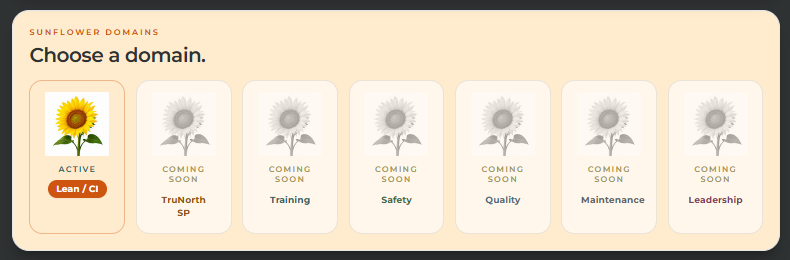
You will see domains as connected parts of the organization, not separate islands of effort. The first active domain is Lean / Continuous Improvement.
03 · First live pathway
Begin with one guided pathway.
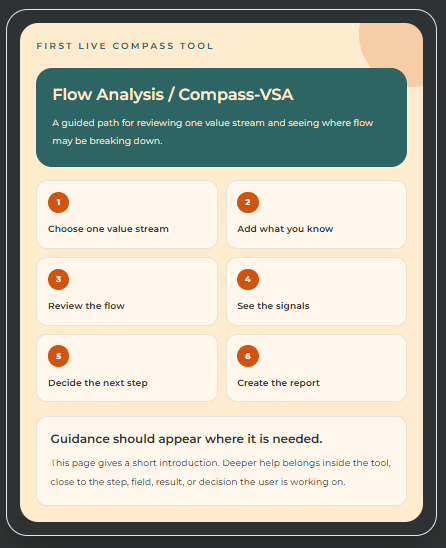
The first live pathway helps you make work visible, understand handoffs and delays, and produce useful results, decisions, and reports.
Preview the outcome
See what your team receives.
This preview shows how CompassPlatform turns basic process data into a current-state view, clear system signals, a recommended starting point, and a practical action plan your team can discuss.
01 · Inputs
Enter the basic operating data.
Start with demand, working time, and takt so the system understands the pace the work must meet.
What you are seeing
This screen captures the basic operating facts: demand, available working time, takt, and the starting context for the value stream.
Why it matters
Good results depend on clear starting information. This gives Compass the pace the work must meet before it analyzes the flow.
Page 1 of 11
Create your account
Start free with CompassPlatform
Create your account when you are ready. You can explore for 7 days with no credit card required. After signup, confirm your email and set up your organization/workspace.
By creating an account, you agree to use CompassPlatform responsibly, review results with your own organizational context, and follow our Terms of Use and Privacy Policy.